The assistant
Improve wording, suggest alt text, run whole plans into the draft — you decide what is taken over.
1 The conversation at the bottom right
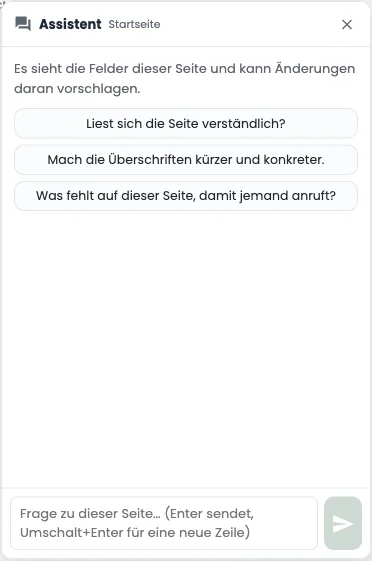
The Assistent button in the bottom right corner opens a conversation about the open page. It sees that page’s fields and proposes changes to them; three opening questions are ready to go (“Does the page read clearly?”). With no page open you can equally ask it what has been left unfinished.
2 Help on a single field
Small icons sit beside text fields: improve the wording, make it shorter, make it longer, translate, and on images suggest alt text. The suggestion is shown to you, not inserted: you read it and choose Übernehmen (use this) or Verwerfen (discard).
3 A whole plan
For larger requests the assistant answers with a plan — a numbered list of what it would do. Als Entwurf ausführen (run into the draft) works through it in order. Nothing is published on the way: blocks, text and SEO land in the draft and appear in the history afterwards, exactly like typed text. On an error it stops, and what came after is not attempted.
4 Read it over, do not trust it
Under every suggestion stands the reminder to check the facts — and it is meant seriously. The model was instructed to invent nothing; that is not the same as not doing it. Please read figures, names, prices and opening hours over before you publish. And if you do not see the buttons at all: no assistant is set up for your website.