Records
Articles, categories, projects, people, services and reviews — everything the site shows that is not a page.
1 What a record is
Some things on a website come in numbers: blog articles, reference projects, the team, your services, customer quotes. Those are not pages in the menu, they are records. Blocks such as Beitragsvorschau (content teaser) and Kundenstimmen (reviews) reach for them and display them — you maintain the record once and it appears everywhere it is used.
2 The tree of kinds
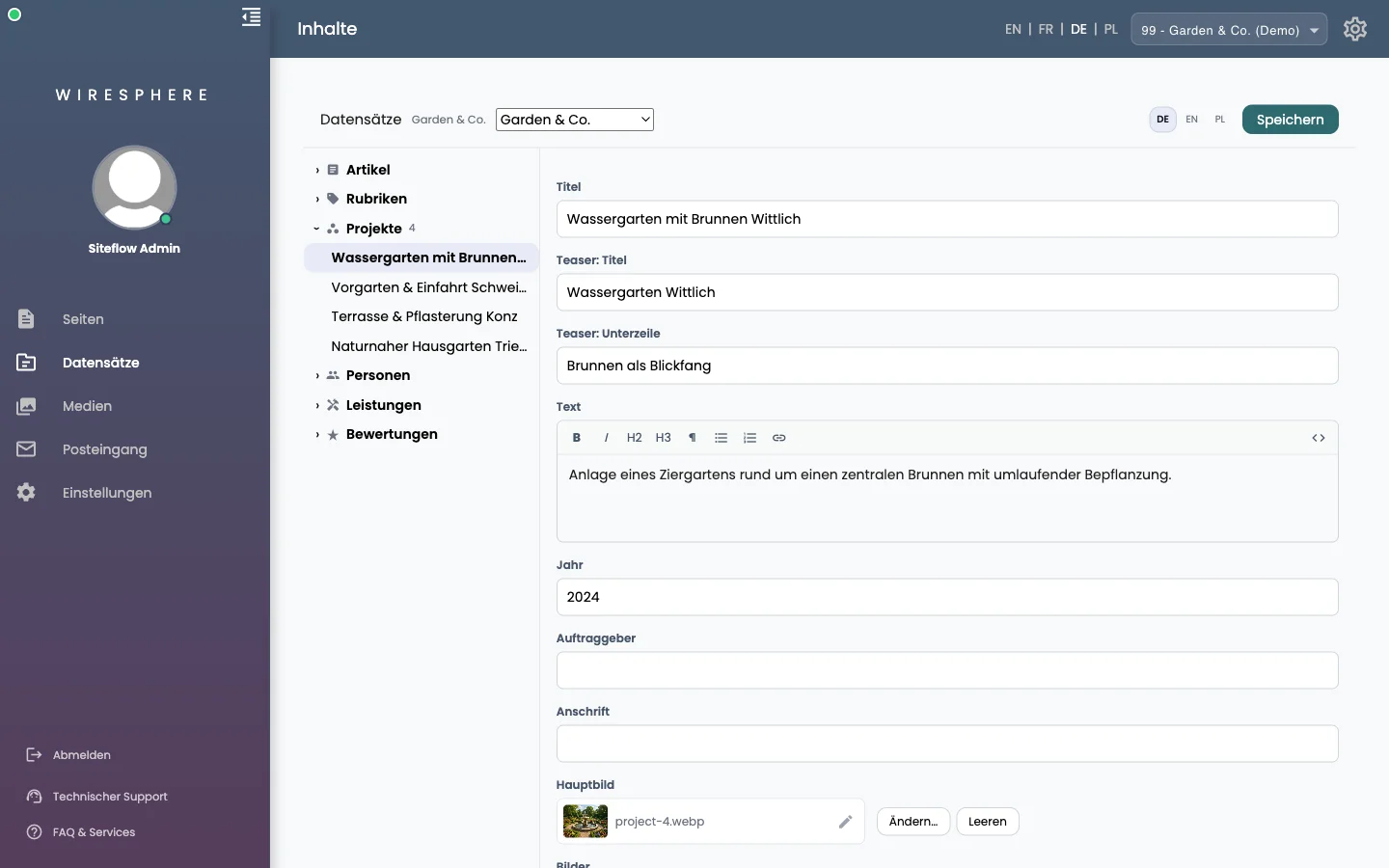
On the left are the kinds your website carries, each with its number of entries. A click folds one open, a click on an entry opens its form. The eigene Seite badge means this kind has a detail page in your design — an entry is then reachable at its own address, a preview joins in as it does for pages, and that page’s sections appear at the bottom of the form. Without the badge, the kind only shows up where a block pulls it in.
3 Change, translate, create
You edit in the form on the right; Speichern at the top right saves. Unlike pages there is no draft here — saved means live. If your website runs several languages, switch at the top and hand the open record to Mit KI übersetzen (translate with AI); it asks for the target language, and please read the result over. This area does not create a new entry by itself — ask the assistant for one (“create an article about …”) or talk to your SiteFlow contact.